
“Small-business payroll is a compliance function, not merely an administrative task. A missed tax deposit, incorrect wage calculation, or improperly classified worker can produce penalties, employee disputes, and additional scrutiny from federal or state agencies.”
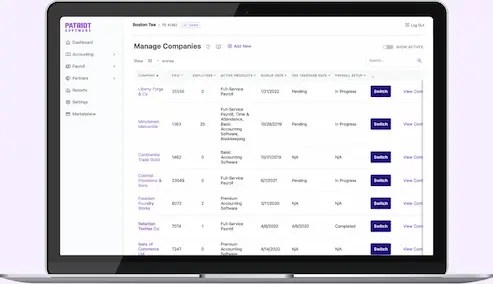
This ranking compares leading payroll software, HR software for small business, and small-business payroll platforms by published pricing, payroll functionality, HR depth, ease of use, and available review signals. Pricing and features were reviewed on August 28, 2026. Vendor promotions, state requirements, employee counts, and contract terms can change the final cost.
Why Main Street is not a bank, payroll processor, accounting firm, financial adviser, or law firm. This article is educational information, not tax, legal, accounting, or employment advice. We are not responsible for vendor accuracy, service interruptions, pricing changes, or business decisions made from this comparison.
Quick ranking
1. Gusto: Best overall payroll and HR software for small business
Gusto earns the top position because it combines transparent pricing, approachable software, automated tax filings, employee self-service, benefits administration, and basic HR workflows.
The current published plans are:
- Simple: $49 per month plus $6 per person
- Plus: $80 per month plus $12 per person
- Premium: $180 per month plus $22 per person
- Contractor Only: $35 per month plus $6 per contractor
The Simple plan is designed for single-state payroll. Plus adds multi-state payroll, next-day pay, and built-in time tracking. Premium adds a dedicated service advisor, certified HR experts, custom reporting, and more advanced performance and compensation tools.
Gusto also provides direct deposit, W-2 and 1099 support, employee self-service, onboarding tools, PTO management, and benefits administration. Its interface is generally regarded as easier for new administrators than traditional payroll systems.
The limitation is scope. Businesses with complex union rules, highly specialized workforce management, or extensive international operations may outgrow Gusto’s simpler structure. Multi-state and advanced HR needs also move the company into more expensive tiers.
Best fit: Startups, professional services firms, creators, agencies, and small employers that want an all-in-one system without negotiating a custom contract.
Review Gusto’s current pricing and plans.
2. OnPay: Best transparent alternative
OnPay ranks second because its pricing structure is direct and its core feature set covers the requirements of many small employers. The published starting price is $49 per month plus $6 per worker.
OnPay includes unlimited payroll runs, federal, state, and local tax filings, year-end W-2 and 1099 filings, employee self-service, direct deposit, PTO management, onboarding, payroll reports, and multi-state payroll. It also offers integrations for benefits, workers’ compensation, retirement plans, accounting, and time management.
The company states that it does not charge implementation or integration fees and includes year-end filings in its plans. Businesses should still examine additional-state charges, benefits costs, and third-party service terms before signing.
OnPay’s HR functions are solid but less extensive than Rippling’s or the upper tiers of ADP. It is not a PEO. The employer remains responsible for its workforce, while OnPay provides software and payroll services.
Best fit: Small businesses that want full-service payroll, multi-state support, and predictable pricing without a large HR technology stack.
See OnPay’s payroll and HR products.
Review OnPay’s pricing information.
3. QuickBooks Payroll: Best for QuickBooks users
QuickBooks Payroll is the most logical choice for companies already using QuickBooks Online for accounting. Payroll data can flow into the company’s general ledger, reducing duplicate entry and reconciliation work.
The current online payroll structure is commonly presented as:
- Workforce Payroll/Core: $50 per month plus $6.50 per employee
- Workforce Premium: $88 per month plus $10 per employee
- Workforce Elite: $134 per month plus $12 per employee
All three plans provide payroll calculation, direct deposit, federal and state tax filing, employee self-service, payroll reports, and year-end forms. Premium adds faster direct deposit, time tracking, and additional HR resources. Elite adds more hands-on expert support, enhanced setup assistance, and tax-penalty protection subject to Intuit’s terms and limitations.
The principal advantage is accounting integration. The principal weakness is that payroll is a separate subscription from QuickBooks accounting. A business comparing total cost must add both subscriptions, not just the payroll fee.
QuickBooks Payroll is less compelling for companies that do not use QuickBooks or that need a broad HR information system. It is payroll-centered, not a full workforce-management platform.
Best fit: Retailers, contractors, professional firms, and other businesses already operating their books through QuickBooks Online.
Check QuickBooks Payroll pricing.
Review QuickBooks’ payroll product information.
4. ADP RUN: Best established provider for growth
ADP RUN is built for small businesses, generally those with 1 to 49 employees. It offers payroll processing, tax calculations and filings, direct deposit, W-2 and 1099 preparation, new-hire reporting, employee self-service, and payroll reporting.
ADP’s official materials state that small-business payroll can start as low as $39 per month plus $5 per employee. That figure is not a guaranteed RUN plan price. ADP uses quote-based pricing, and the final amount depends on headcount, pay frequency, states, selected tier, and add-ons.
RUN is offered through packages commonly identified as Essential, Enhanced, Complete Payroll & HR Plus, and HR Pro. Higher tiers can add state unemployment insurance administration, garnishment services, recruiting tools, HR help-desk access, employee handbooks, training, and legal resources.
ADP’s scale is an advantage for businesses expecting more complex payroll or a transition into larger-company systems. Its quote process is the trade-off. Buyers should request a written, itemized proposal that identifies base fees, per-employee fees, pay-run charges, setup fees, and optional modules.
Best fit: Employers that value a traditional provider, established support infrastructure, and a potential path beyond basic small-business payroll.
Review ADP RUN’s small-business payroll packages.
5. Rippling: Best for integrated HR and IT automation

Rippling is more than payroll software. Its platform can connect payroll with employee records, onboarding, benefits, time tracking, recruiting, device management, app access, expense management, and workflow automation.
Rippling’s published pricing states that the core platform starts at $8 per employee per month, with a monthly base fee for some small-business plans. Payroll pricing is generally custom quoted. The company allows customers to purchase products separately, but the core platform is required.
The platform’s payroll features include federal, state, and local tax filing, W-2, W-4, and 1099 support, direct deposit, PTO tracking, garnishments, workers’ compensation, multiple pay rates, and international workforce options.
Rippling’s review signals are strong on its pricing page, which displays ratings from platforms including G2, Capterra, GetApp, and Software Advice. Those ratings are vendor-presented and should not be treated as an independent audit.
The risk is cost and complexity. A company buying HR, payroll, benefits, time, IT, and finance modules can accumulate a materially higher monthly bill than the starting price suggests.
Best fit: Technology companies, distributed teams, and growing employers that want one connected operating system for workforce administration.
6. Patriot Payroll: Best budget option
Patriot offers the lowest published entry price in this comparison.
- Basic Payroll: $17 per month plus $4 per worker paid
- Full Service Payroll: $37 per month plus $5 per worker paid
Basic Payroll calculates payroll but leaves tax filing and deposits to the employer. Full Service Payroll handles federal, state, and local filings, deposits, and year-end filings. Patriot also offers unlimited payrolls, direct deposit, employee self-onboarding, employee portals, multiple pay rates, PTO accruals, payroll reports, and mobile access.
HR and time-and-attendance tools are available as add-ons. Patriot’s official pricing page also displays 2026 review badges tied to customer-support, ease-of-use, and recommendation categories.
The central limitation is that Patriot is not as broad an HR platform as Gusto, Rippling, or higher-tier ADP. Additional-state filing charges may also apply to Full Service Payroll.
Best fit: Very small employers that prioritize low cost, basic payroll functionality, and U.S.-based support.
Review Patriot Payroll’s current pricing.
How to choose the best small-business payroll software
Start with compliance requirements, not brand recognition.
Confirm whether the platform supports your states, local tax jurisdictions, pay frequency, contractor payments, garnishments, benefits deductions, and required year-end forms. Then calculate the full monthly cost using your actual employee count.
Ask each provider for written answers to five questions:
- Are tax filings and deposits included?
- Are there setup, migration, per-run, or year-end fees?
- How are additional states priced?
- Which HR features are included versus sold as add-ons?
- What happens if the provider makes a filing error?
For most small businesses, Gusto is the strongest general-purpose choice. OnPay is the clearest alternative for transparent full-service payroll. QuickBooks Payroll is the practical option for existing QuickBooks users. ADP RUN suits employers planning for greater complexity. Rippling is the strongest automation platform, while Patriot is the budget leader.
Pricing is not a legal guarantee, and software does not eliminate the employer’s statutory responsibilities. Verify every quote, service agreement, tax obligation, and employment rule before implementation.
Why Main Street is an independent, member-owned financial education and social platform. We are not responsible for the accuracy of third-party claims, vendor pricing, product performance, or reader outcomes. Join on web: coming soon!


Leave a Reply